


eBay online shopping & selling
4.5692.55K Reviews
App Specs
- Version
- Varies with Device
- Updated On
- License
- Free
- Downloads
- 100,000,000+
- Developer
- eBay Mobile
- Categories
- Shopping
- Platform
- Android, iOS
Screenshots

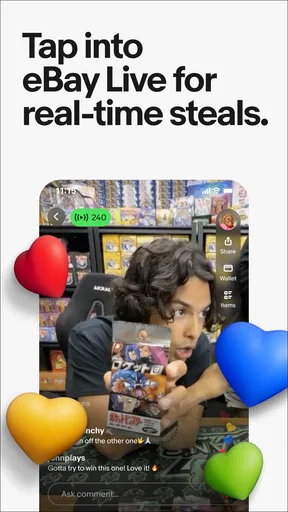


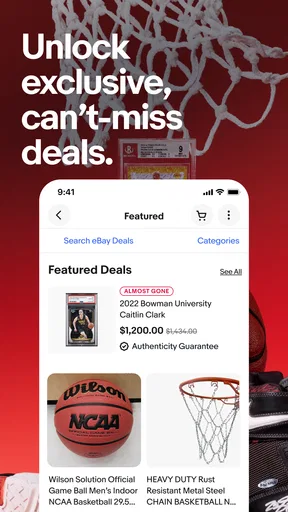
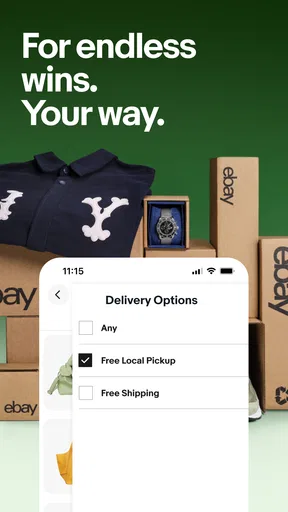


 Analysis by AppCompare
If you're like me and love to snag a good deal while shopping from your couch, then eBay might just be your new best friend. Navigating the world of online shopping can be overwhelming, but eBay simplifies the process with its robust platform designed for both buyers and sellers. Let's dive into what makes this app a go-to for my shopping sprees.
Before I open any marketplace, I ask myself what I actually need: the lowest straightforward price, a specific item that is hard to find, or a place to sell something I no longer use. That distinction matters with eBay. It is a free shopping app from eBay Mobile, rated for teens, and its mix of buying and selling makes it more useful for some errands than others. The app has a 4.6 average from around five million ratings, but I still treat each listing as its own decision rather than assuming the marketplace guarantees a perfect match.
Welcome to the World of Endless Possibilities
From the moment you fire up the eBay app, you're greeted with a user-friendly interface that makes browsing a breeze. Whether you're hunting for a rare collectible or just some trendy clothes, eBay’s got you covered with its extensive categories. I often find myself lost in a treasure trove of products, each waiting to be discovered.
Guides and Analysis on eBay online shopping & selling
That breadth is where I find the clearest advantage over a retailer’s own app. When I know the exact brand and model of a new everyday item, a dedicated store can be simpler: fewer seller choices and a more direct route to checkout. When I am looking for an older accessory, a discontinued version, a used item, or an unusual collectible, eBay is more compelling because the search can surface different kinds of listings in one place. The trade-off is that I need to compare condition, seller details, photos, and delivery terms instead of treating two results as interchangeable.
One feature I absolutely love is the "Watchlist." I can track items I'm interested in and swoop in at the last minute to secure my win. It's a little adrenaline rush every time I place a bid, and let me tell you, that thrill never gets old.
I also use the Watchlist as a decision tool, not just a bidding reminder. If I see similar versions of an item, saving them gives me time to compare the condition and total checkout cost before committing. For auctions, I try to decide my ceiling in advance rather than letting the countdown push me into paying more than I intended. A saved item is not a promise that it will remain available, so for a time-sensitive purchase I would not rely on watching alone.
Selling Made Easy
Now, if you're looking to declutter and make some extra cash, eBay's selling interface is a game-changer. Listing items is straightforward, thanks to the app’s step-by-step guide. You can snap photos, write descriptions, and set your price all in one go. Trust me, you don’t need to be a tech guru to get your items up for sale.
Worth Reading Before You Choose

QuizzLand Review: A Good Fit for Short Trivia Breaks, Not Every Player

Basketball Stars: Multiplayer Is Fast, but Can It Recover When Matches Go Wrong?

WEBTOON Turns Phone Updates Into a Better Reading Routine

Link to Windows Runs on Shared Habits, Not Social Feeds

How Alibaba.com Dominates the B2B Marketplace

Metro's Quiet Rise: Redefining Mobile Communication
The main practical question for a first-time seller is not how to tap through the listing flow; it is whether the item is worth the effort of photographing, describing, and handling a sale. I would start with one item whose condition I can explain clearly, take pictures that show wear as well as the overall look, and write down any missing parts or flaws before publishing. That small bit of preparation helps set expectations and makes comparisons with similar listings more useful. For something bulky, fragile, or difficult to package, I would think through the handoff and delivery details before deciding that a marketplace sale is the easiest option.
I’ve sold a few gadgets and fashion items myself, and the process was seamless. The app even suggests price ranges based on similar items, which is super helpful if you’re unsure about pricing. Plus, with eBay’s global reach, your products can find a home anywhere in the world.
Price suggestions are a starting point, not a substitute for judgment. Similar-looking gadgets can differ by condition, included accessories, or exact model, and those differences affect what a buyer will consider a fair deal. I compare like with like and decide whether I value a quicker sale or prefer to wait for a price I am comfortable with. If I mainly want to clear out a low-value item quickly, donating it or using a local selling option may be less work than preparing a listing and managing a transaction.
Shopping with Confidence
One of the concerns with online shopping is trust. However, eBay's buyer protection policies ensure you're covered. I've had instances where items weren't as described, and eBay stepped in to resolve the issues promptly. This kind of security is priceless and makes me feel valued as a customer.
I still recommend reading the listing carefully before paying. I check whether the photos show the actual item, look for details about condition, and make sure the description matches the version I want. If something important is unclear, I would rather ask before buying than rely on a later resolution. Marketplace protections are reassuring when a purchase goes wrong, but they do not remove the need to make a careful choice at checkout.
Another cool feature is the option to "Make an Offer" on items. I love the flexibility this adds, allowing for a bit of negotiation. It’s like haggling at a flea market, but from the comfort of my home.
For an everyday example, say I need a replacement part for an older device. I can search by the exact model, compare several listings, save the promising ones, and consider an offer when the listing allows it. I would check compatibility and condition before focusing on the asking price. If I need the part immediately and cannot risk a mismatch, buying from a specialist with a clear returns process may suit me better; if I can take time to compare options, eBay’s variety can be worth the extra checking.
Choosing the Right Marketplace
eBay is strongest when I want choice: secondhand goods, collectible finds, older products, or a chance to sell something from home. It is less ideal when I want a standardized item with no seller-to-seller variation, or when speed and a simple, predictable purchase matter more than comparing listings. In those cases, I would use the manufacturer’s shop, a familiar retailer, or a local option depending on the item. Those alternatives can reduce comparison work, while eBay gives me a wider mix of new and used listings and the ability to buy and sell in the same app.
Switching to eBay does not require replacing every shopping habit. I would keep using the stores I trust for routine essentials and open eBay when I have a specific search, a secondhand item in mind, or something to list. Its scale is substantial, with more than 100 million installs, but that does not mean every search will produce a listing I should buy. The useful habit is to compare the full listing and checkout details, not just the headline price.
Wrapping It Up
At the end of the day, the eBay app has revolutionized the way I shop and sell online. From its vast array of products to the intuitive selling process, it’s a must-have tool for anyone looking to dive into the world of online marketplaces. So, next time you're pondering where to find that unique item or how to sell your unwanted goods, give eBay a whirl. You might just find your new favorite shopping app.
My recommendation is to try it when the marketplace format gives you a real advantage: a hard-to-find purchase, a used alternative, or a sensible way to pass along an item you no longer need. Keep your expectations practical, compare listings carefully, and do not feel obliged to use it for every routine purchase. With around 687,000 written reviews and a free download, it is easy to explore, but the best results still come from knowing what you want and checking the details before you commit.
Pros
- Wide range of products available.
- User-friendly interface with easy navigation.
- Secure payment options offered.
- Regular updates enhance performance.
- Strong buyer and seller protection policies.
Cons
- Occasional app crashes reported.
- Some listings lack detailed descriptions.
- High seller fees for certain categories.
- Shipping times can vary significantly.
- In-app ads can be intrusive.
FAQs for eBay online shopping & selling
How do I create an account on eBay?
Creating an account on eBay is simple. You can sign up using your email address or your Facebook or Google account. Just click 'Register' on the homepage and follow the prompts. Make sure to fill in your details accurately to ensure a smooth buying and selling experience.
What payment methods are accepted on eBay?
eBay supports a variety of payment methods for your convenience. These include major credit cards, PayPal, Apple Pay, Google Pay, and eBay gift cards. Some sellers may also accept other forms of payment, so it's important to check the listing details for specific options.
How can I ensure the safety of my transactions on eBay?
eBay offers several features to ensure transaction safety, such as the eBay Money Back Guarantee. Always check seller ratings and reviews before making a purchase. Use secure payment methods like PayPal to protect your financial information and ensure a safe and reliable transaction.
What should I do if I encounter a problem with a purchase?
If you encounter an issue with a purchase, first contact the seller through eBay's messaging system to resolve the problem. If the issue isn't resolved, you can open a case with eBay's Resolution Center, which provides a structured process to address disputes and ensure customer satisfaction.
How does the bidding process work on eBay?
The bidding process on eBay is straightforward. You enter the maximum amount you're willing to pay for an item, and eBay automatically increases your bid incrementally to maintain your status as the highest bidder. Keep an eye on the auction end time and be prepared to adjust your bid if needed.


